Updated: 1 October 2026
ಇಂದು appointment confirmation, order update, OTP, customer support, payment reminder, offers, marketing campaigns ಸೇರಿದಂತೆ ಬಹುತೇಕ business communicationಗೆ WhatsApp ಪ್ರಮುಖ ಮಾಧ್ಯಮವಾಗಿದೆ.
ಆದರೆ WhatsApp Business App ಮತ್ತು WhatsApp Business Platform/API ಒಂದೇ ಅಲ್ಲ. ವಿಶೇಷವಾಗಿ API ಬಳಸುವ ಕಂಪನಿಗಳು “ಒಂದು WhatsApp message ಕಳುಹಿಸಿದರೆ ಎಷ್ಟು charge?”, “customer reply ಮಾಡಿದರೆ freeನಾ?”, “OTPಗೆ charge ಇದೆಯಾ?”, “24-hour window ಎಂದರೇನು?” ಎಂಬುದನ್ನು ಸರಿಯಾಗಿ ತಿಳಿದುಕೊಳ್ಳುವುದು ಮುಖ್ಯ.
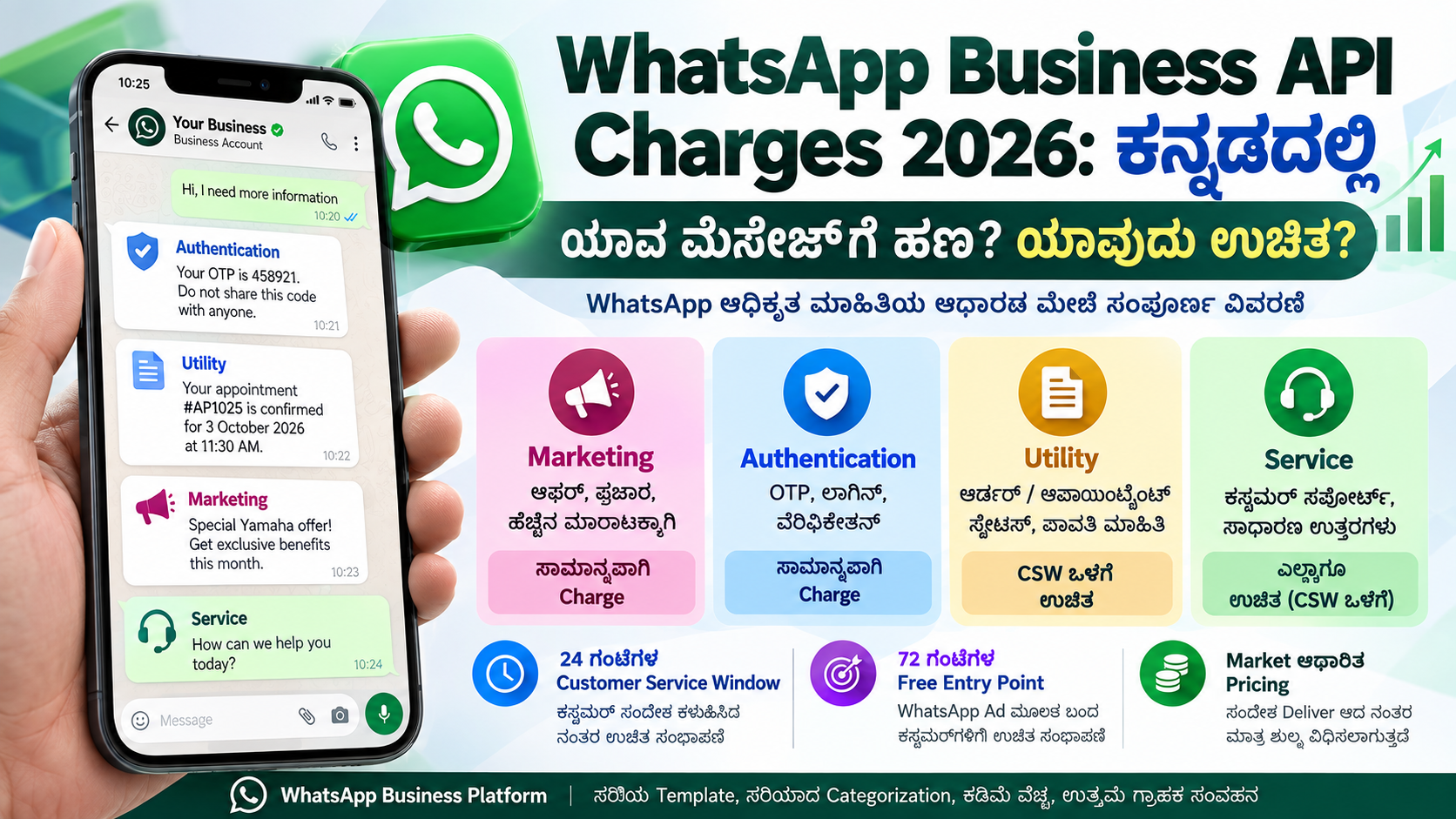
WhatsAppನ ಪ್ರಸ್ತುತ ಅಧಿಕೃತ pricing ಪ್ರಕಾರ, WhatsApp Business Platformನಲ್ಲಿ businessಗೆ charge ಅನ್ನು conversation ಆಧಾರದಲ್ಲಿ ಅಲ್ಲ, delivered message ಆಧಾರದಲ್ಲಿ ಲೆಕ್ಕಿಸಲಾಗುತ್ತದೆ. ಅಂದರೆ message ಕೇವಲ send ಆಗಿದ್ದಕ್ಕಾಗಿ charge ಅಲ್ಲ; ಅದು recipientಗೆ delivered ಆದಾಗ applicable charge ಲೆಕ್ಕವಾಗುತ್ತದೆ. Pricing recipient ಇರುವ market ಹಾಗೂ message category ಮೇಲೆ ಅವಲಂಬಿತವಾಗಿರುತ್ತದೆ. WhatsApp for Business
WhatsApp Business Platform – Official Pricing
WhatsApp Business Platformನಲ್ಲಿ 4 ಮುಖ್ಯ Message Categories
WhatsApp ಅಧಿಕೃತವಾಗಿ business messages ಅನ್ನು ನಾಲ್ಕು ಮುಖ್ಯ ವಿಭಾಗಗಳಾಗಿ ವಿಂಗಡಿಸಿದೆ:
Marketing, Utility, Authentication ಮತ್ತು Service. ಪ್ರತಿ categoryಯ purpose ಮತ್ತು billing rule ವಿಭಿನ್ನವಾಗಿದೆ. WhatsApp for Business
1. Marketing Messages — ಪ್ರಚಾರ ಮತ್ತು ಮಾರಾಟಕ್ಕಾಗಿ
Marketing messages ಎಂದರೆ customerಗೆ product, service, discount, offer ಅಥವಾ promotion ಬಗ್ಗೆ ತಿಳಿಸುವ messages.
ಉದಾಹರಣೆಗೆ:
“ಈ ವಾರ Yamaha scooters ಮೇಲೆ ವಿಶೇಷ offer ಲಭ್ಯವಿದೆ.”
ಅಥವಾ:
“ನಮ್ಮ ಹೊಸ product launch ಆಗಿದೆ. ಈಗಲೇ order ಮಾಡಿ.”
WhatsApp ಅಧಿಕೃತ ವಿವರಣೆಯ ಪ್ರಕಾರ promotions, coupons, product recommendations, price-drop announcements, abandoned-cart reminders, upselling, subscription renewal promotions ಮುಂತಾದವು Marketing categoryಗೆ ಸೇರಬಹುದು. Customerನ consent/opt-in ಪಡೆದು marketing messages ಬಳಸುವುದು ಮುಖ್ಯ. WhatsApp for Business
ಮುಖ್ಯ ವಿಷಯ: Customer Service Window open ಇದ್ದರೂ Marketing Template ಸಾಮಾನ್ಯವಾಗಿ billable.
ಅಂದರೆ customer ಈಗಷ್ಟೇ ನಿಮಗೆ message ಕಳುಹಿಸಿದ್ದಾನೆ ಎಂಬ ಕಾರಣಕ್ಕೆ marketing template automatically free ಆಗುವುದಿಲ್ಲ.
2. Utility Messages — Transaction ಮತ್ತು Service Updates
Utility messages business automationಗೆ ಅತ್ಯಂತ ಉಪಯುಕ್ತ category.
Customer ಮಾಡಿದ action ಅಥವಾ existing transactionಗೆ ಸಂಬಂಧಿಸಿದ, promotional ಅಲ್ಲದ ಮಾಹಿತಿಯನ್ನು Utility Message ಎಂದು ಪರಿಗಣಿಸಲಾಗುತ್ತದೆ.
ಉದಾಹರಣೆಗೆ:
“ನಿಮ್ಮ Appointment #AP1025 ನಾಳೆ ಬೆಳಿಗ್ಗೆ 11:30ಕ್ಕೆ Confirm ಆಗಿದೆ.”
“ನಿಮ್ಮ Order #45821 dispatch ಆಗಿದೆ.”
“ನಿಮ್ಮ payment ಯಶಸ್ವಿಯಾಗಿ ಸ್ವೀಕರಿಸಲಾಗಿದೆ.”
“ನಿಮ್ಮ subscription renewal date 10 October 2026.”
WhatsApp ಪ್ರಕಾರ order confirmation, order status, cancellations, account updates, payment reminders, post-purchase alerts ಮತ್ತು ಕೆಲವು customer-feedback messages Utility categoryಗೆ ಸೇರಬಹುದು. WhatsApp for Business
ಇಲ್ಲೇ businessಗೆ ಒಂದು ದೊಡ್ಡ cost advantage ಇದೆ.
Customer Service Window open ಇದ್ದು customerಗೆ response ಆಗಿ ಕಳುಹಿಸುವ Utility messagesಗೆ WhatsApp charge ಮಾಡುವುದಿಲ್ಲ. WhatsApp for Business
ಆದರೆ customer interaction ಇಲ್ಲದೆ ಅಥವಾ applicable free window ಹೊರಗೆ business ಸ್ವತಃ Utility Template ಕಳುಹಿಸಿದರೆ applicable Utility rate ಅನ್ವಯಿಸಬಹುದು.
3. Authentication Messages — OTP ಮತ್ತು Verification
Login verification, registration verification, account recovery ಅಥವಾ transaction verificationಗಾಗಿ ಕಳುಹಿಸುವ One-Time Password messages Authentication Messages.
ಉದಾಹರಣೆಗೆ:
“638921 is your verification code. Do not share this code with anyone.”
WhatsApp authentication templatesನಲ್ಲಿ OTP ಜೊತೆಗೆ one-tap, auto-fill ಮತ್ತು ಕೆಲವು implementationsನಲ್ಲಿ zero-tap capabilities ಕೂಡ ಲಭ್ಯವಿವೆ. WhatsApp for Business
Authentication ಬಳಕೆಗಳು:
ಹೊಸ account registration, login verification, password/account recovery, transaction confirmation ಮತ್ತು identity verification.
Authentication messages ಸಾಮಾನ್ಯ Customer Service Window ಒಳಗೆ ಇದ್ದರೂ chargeable category ಆಗಿರುತ್ತದೆ. ಆದರೆ Free Entry Point window ಅನ್ವಯಿಸಿದರೆ charge ಇಲ್ಲದಿರಬಹುದು. WhatsApp for Business
4. Service Messages — Customer Support
Customer ಮೊದಲು businessಗೆ WhatsApp message ಕಳುಹಿಸಿದಾಗ 24-hour Customer Service Window (CSW) open ಆಗುತ್ತದೆ.
ಈ 24 ಗಂಟೆಯೊಳಗೆ business normal/free-form replies ಮೂಲಕ customerಗೆ support ನೀಡಬಹುದು.
ಉದಾಹರಣೆಗೆ customer:
“ನನ್ನ appointment ಯಾವಾಗ?”
Business:
“ನಿಮ್ಮ appointment ಇಂದು ಮಧ್ಯಾಹ್ನ 2 ಗಂಟೆಗೆ ನಿಗದಿಯಾಗಿದೆ.”
ಇದು Service Message.
WhatsApp ಅಧಿಕೃತ pricing ಪ್ರಕಾರ Service Messagesಗೆ charge ಇಲ್ಲ. Customerನ ಪ್ರತಿ ಹೊಸ message ಬಂದಾಗ 24-hour Customer Service Window ಮತ್ತೆ reset ಆಗುತ್ತದೆ. WhatsApp for Business
ಇದು customer-support automation, chatbot, helpdesk ಮತ್ತು live-agent systemsಗೆ ಬಹಳ ಮುಖ್ಯ.
24-Hour Customer Service Window ಎಂದರೇನು?
Customer ನಿಮ್ಮ businessಗೆ message ಕಳುಹಿಸಿದ ಕ್ಷಣದಿಂದ ಸಾಮಾನ್ಯವಾಗಿ 24 ಗಂಟೆಗಳ customer service window open ಆಗುತ್ತದೆ.
ಉದಾಹರಣೆಗೆ customer ಇಂದು ಬೆಳಿಗ್ಗೆ 10:00 AMಗೆ:
“My order status?”
ಎಂದು ಕಳುಹಿಸಿದರೆ, applicable customer-service windowನಲ್ಲಿ business customerಗೆ Service Messages ಮೂಲಕ reply ಮಾಡಬಹುದು.
ಈ windowನಲ್ಲಿ:
| Message Category | ಸಾಮಾನ್ಯ Billing |
|---|---|
| Service / Free-form | ✅ Free |
| Utility | ✅ Customerಗೆ response ಆಗಿ ಕಳುಹಿಸಿದರೆ Free |
| Marketing | 💰 Billable |
| Authentication / OTP | 💰 Billable |
WhatsAppನ current pricing page service messages ಮತ್ತು customerಗೆ response ಆಗಿ ಕಳುಹಿಸುವ utility messagesಗೆ charge ಮಾಡುವುದಿಲ್ಲ ಎಂದು ಸ್ಪಷ್ಟಪಡಿಸುತ್ತದೆ. WhatsApp for Business
Customer ಮತ್ತೆ message ಕಳುಹಿಸಿದರೆ Customer Service Window ಮತ್ತೆ reset ಆಗುತ್ತದೆ.
24 ಗಂಟೆ ಮುಗಿದ ನಂತರ ಏನಾಗುತ್ತದೆ?
Customerನ last message ನಂತರ 24-hour service window ಮುಗಿದರೆ normal free-form Service Message ಮೂಲಕ business conversation ಆರಂಭಿಸಲು ಸಾಧ್ಯವಿಲ್ಲ.
Business customerನೊಂದಿಗೆ ಮತ್ತೆ communication ಆರಂಭಿಸಬೇಕಾದರೆ ಸಾಮಾನ್ಯವಾಗಿ approved Message Template ಬಳಸಬೇಕು.
ಉದಾಹರಣೆಗೆ:
Utility Template
“ನಿಮ್ಮ service appointment ನಾಳೆ ಬೆಳಿಗ್ಗೆ 10:30ಕ್ಕೆ ನಿಗದಿಯಾಗಿದೆ.”
Marketing Template
“ಈ ತಿಂಗಳ ವಿಶೇಷ service offer ಪಡೆಯಿರಿ.”
Authentication Template
“482915 is your login verification code.”
Business-initiated messagesಗೆ applicable category pricing ಅನ್ವಯಿಸುತ್ತದೆ.
WhatsApp Business Messaging Policy ಪ್ರಕಾರ business-initiated communicationಗೆ approved templates ಬಳಸಬೇಕಾಗುತ್ತದೆ; customer message ನಂತರದ service periodನಲ್ಲಿ template ಇಲ್ಲದೇ reply ಮಾಡಲು ಅವಕಾಶವಿದೆ. WhatsApp for Business
72-Hour Free Entry Point — ಬಹಳ ಮುಖ್ಯವಾದ Cost-Saving Feature
WhatsApp pricingನಲ್ಲಿ ಇನ್ನೊಂದು ಬಹಳ ಉಪಯುಕ್ತ ವ್ಯವಸ್ಥೆ Free Entry Point Window (FEP).
Customer ಒಂದು:
Click-to-WhatsApp Ad ಅಥವಾ Facebook Page Call-to-Action button
ಮೂಲಕ businessಗೆ WhatsApp message ಮಾಡಿದರೆ, WhatsApp ಪ್ರಕಾರ ನಂತರದ 3 ದಿನಗಳು / 72 ಗಂಟೆಗಳವರೆಗೆ messagesಗೆ charge ಇರುವುದಿಲ್ಲ, applicable free-entry conditions ಒಳಗೆ. ಇದು ವಿವಿಧ message categoriesಗೂ ಅನ್ವಯಿಸುತ್ತದೆ. WhatsApp for Business
ಅಂದರೆ customer Facebook ಅಥವಾ Instagram advertisement ಮೂಲಕ WhatsApp conversation ಆರಂಭಿಸಿದ ಸಂದರ್ಭದಲ್ಲಿ businessesಗೆ ದೊಡ್ಡ cost advantage ಸಿಗಬಹುದು.
ಉದಾಹರಣೆ
Customer ನಿಮ್ಮ Facebook “Chat on WhatsApp” advertisement click ಮಾಡಿ:
“I need more information.”
ಎಂದು WhatsApp message ಮಾಡಿದರು.
ಅಲ್ಲಿ applicable Free Entry Point window ಆರಂಭವಾದರೆ ಮುಂದಿನ 72 ಗಂಟೆಗಳಲ್ಲಿ business ನಡೆಸುವ messagingಗೆ WhatsApp platform charge ಇರದಿರಬಹುದು. WhatsApp for Business
Lead-generation campaigns ನಡೆಸುವ businesses ಈ rule ಅನ್ನು ಸರಿಯಾಗಿ ಬಳಸಿದರೆ communication cost ಕಡಿಮೆ ಮಾಡಬಹುದು.
WhatsApp ಯಾವಾಗ Charge ಮಾಡುತ್ತದೆ?
WhatsAppನ current modelನಲ್ಲಿ ಒಂದು ಮುಖ್ಯ rule:
Sent ಅಲ್ಲ — Delivered ಆದಾಗ charge
Business API ಒಂದು message submit ಮಾಡಿತು ಎಂದಷ್ಟೇ charge ಆಗುತ್ತದೆ ಎನ್ನುವುದು ಸರಿಯಲ್ಲ.
WhatsApp ಅಧಿಕೃತ pricing page ಪ್ರಕಾರ billing delivered message ಆಧಾರಿತವಾಗಿದೆ. WhatsApp for Business
ಅಂದರೆ billing calculationಗೆ ಮೂರು ಪ್ರಮುಖ ವಿಷಯಗಳು:
Message delivered ಆಯಿತೇ?
ಯಾವ category?
Message ಯಾವ marketನ recipientಗೆ ಹೋಗುತ್ತಿದೆ?
Pricing market-category combination ಪ್ರಕಾರ ಬದಲಾಗುತ್ತದೆ. WhatsApp for Business
ಭಾರತದಲ್ಲಿ WhatsApp API Charge ಎಷ್ಟು?
ಇಲ್ಲಿ ಒಂದು fixed universal number ಹೇಳುವುದು ಸರಿಯಲ್ಲ.
WhatsApp ತನ್ನ official pricing pageನಲ್ಲಿ Market + Currency + Message Category ಆಯ್ಕೆ ಮಾಡುವ ವ್ಯವಸ್ಥೆ ನೀಡಿದೆ. India ಪ್ರತ್ಯೇಕ market ಆಗಿ listed ಆಗಿದೆ. Marketing, Utility, Authentication, Service ಹಾಗೂ Authentication International categoriesಗೆ applicable rates pricing toolನಲ್ಲಿ ನೋಡಬಹುದು. WhatsApp for Business
Rates ಕಾಲಕಾಲಕ್ಕೆ ಬದಲಾಗಬಹುದು. ಆದ್ದರಿಂದ blog article ಅಥವಾ softwareನಲ್ಲಿ ₹0.xx ಅನ್ನು hard-code ಮಾಡುವ ಬದಲು current rate ಅನ್ನು WhatsApp Official Rate Card ಮೂಲಕ verify ಮಾಡುವುದು ಉತ್ತಮ.
Check Current India WhatsApp Business API Rates
ಹೆಚ್ಚು Messages ಕಳುಹಿಸಿದರೆ Discount ಇದೆಯೇ?
ಹೌದು. Current WhatsApp pricing modelನಲ್ಲಿ Utility ಮತ್ತು Authentication messagesಗೆ Volume Tiers ಲಭ್ಯವಿವೆ.
Business ಹೆಚ್ಚಿನ eligible messages ಕಳುಹಿಸಿದಂತೆ applicable volume tier ಆಧಾರದಲ್ಲಿ ಹೆಚ್ಚು favourable pricing unlock ಆಗಬಹುದು. WhatsAppನ pricing tool estimated monthly message volume ಆಧಾರದಲ್ಲಿ charges, average rate ಮತ್ತು savings ಲೆಕ್ಕಿಸಲು ಅವಕಾಶ ನೀಡುತ್ತದೆ. WhatsApp for Business
ಹೀಗಾಗಿ ದೊಡ್ಡ enterprisesಗೆ:
Monthly Volume ↑ → Applicable Tier → Lower Effective Rate
ಎಂಬ cost structure ಪ್ರಯೋಜನಕಾರಿಯಾಗಬಹುದು.
Marketing messagesಗೆ ಇದೇ utility/authentication volume-tier treatment ಇದೆ ಎಂದು assume ಮಾಡಬಾರದು; official pricing calculatorನಲ್ಲಿ category-wise rate ಪರಿಶೀಲಿಸಬೇಕು.
ಒಂದು ಸರಳ Billability Table
| Message | CSW ಹೊರಗೆ | 24-hour CSW ಒಳಗೆ | 72-hour FEP |
|---|---|---|---|
| Marketing Template | 💰 Charge | 💰 Charge | ✅ Free |
| Authentication Template | 💰 Charge | 💰 Charge | ✅ Free |
| Utility Template | 💰 Charge | ✅ Free* | ✅ Free |
| Service / Free-form | ❌ ಸಾಮಾನ್ಯವಾಗಿ ಕಳುಹಿಸಲಾಗುವುದಿಲ್ಲ | ✅ Free | ✅ Free |
* Customer interactionಗೆ response ಆಗಿ applicable service windowನಲ್ಲಿ ಕಳುಹಿಸುವ Utility messages ಕುರಿತು.
ಈ structure WhatsAppನ current platform pricing logicಗೆ ಅನುಗುಣವಾಗಿದೆ. WhatsApp for Business
Businessಗಳಿಗೆ Cost ಕಡಿಮೆ ಮಾಡುವ Practical Strategy
WhatsApp API ಬಳಸುವ application ಅನ್ನು design ಮಾಡುವಾಗ ಪ್ರತಿಯೊಂದು notificationನ್ನೂ Marketing ಎಂದು ಕಳುಹಿಸುವುದು ಸರಿಯಾದ ವಿಧಾನವಲ್ಲ.
ಉದಾಹರಣೆಗೆ appointment softwareನಲ್ಲಿ:
“Your appointment is confirmed” → Utility
“Your appointment is tomorrow at 10 AM” → Utility
“Your OTP is 819211” → Authentication
“20% discount available this weekend” → Marketing
Customer: “Appointment status?” → Business reply → Service
ಸರಿಯಾದ category ಬಳಸುವುದರಿಂದ unnecessary cost ಕಡಿಮೆಯಾಗುವುದರ ಜೊತೆಗೆ template approval ಮತ್ತು policy compliance ಕೂಡ ಉತ್ತಮವಾಗುತ್ತದೆ.
ಆದರೆ ಒಂದು Utility notificationನಲ್ಲಿ promotional sentence ಸೇರಿಸಿದರೆ ಅದರ classification ಬದಲಾಗುವ ಸಾಧ್ಯತೆ ಇದೆ. ಆದ್ದರಿಂದ transactional ಮತ್ತು promotional content ಅನ್ನು ಸಾಧ್ಯವಾದಷ್ಟು ಪ್ರತ್ಯೇಕವಾಗಿಡುವುದು ಸೂಕ್ತ.
Opt-in ಅನ್ನು ಕಡೆಗಣಿಸಬೇಡಿ
WhatsApp Business Platformನಲ್ಲಿ business customerಗೆ proactive communication ಕಳುಹಿಸುವ ಮುನ್ನ ಸರಿಯಾದ user opt-in / consent ವ್ಯವಸ್ಥೆ ಅತ್ಯಂತ ಮುಖ್ಯ.
WhatsApp Business Messaging Policy ಪ್ರಕಾರ customers ಯಾವ ರೀತಿಯ messages ಪಡೆಯುತ್ತಾರೆ ಎಂಬುದು ಅವರಿಗೆ ಸ್ಪಷ್ಟವಾಗಿರಬೇಕು. Marketing, order updates ಮುಂತಾದ categoriesಗೆ appropriate consent ಪಡೆಯುವುದು ಉತ್ತಮ practice. Users business ಅನ್ನು block ಅಥವಾ report ಮಾಡಬಹುದು; excessive negative feedback business messaging ability ಮೇಲೆ ಪರಿಣಾಮ ಬೀರುವ ಸಾಧ್ಯತೆಯೂ ಇದೆ. WhatsApp for Business
“Number ನಮ್ಮ ಬಳಿ ಇದೆ, ಆದ್ದರಿಂದ WhatsApp ಮಾಡಬಹುದು” ಎಂಬ approach business APIನಲ್ಲಿ ಸರಿಯಾದ policy strategy ಅಲ್ಲ.
WhatsApp Business App ಮತ್ತು WhatsApp Business API ಒಂದೇ ಅಲ್ಲ
ಈ pricing rules ಮುಖ್ಯವಾಗಿ WhatsApp Business Platform / Cloud API ಬಳಸುವ businessesಗೆ ಸಂಬಂಧಿಸಿದವು.
ಸಣ್ಣ ಅಂಗಡಿಯಲ್ಲಿ manually WhatsApp Business App ಬಳಸುವುದು ಮತ್ತು CRM, website, ERP, appointment software ಅಥವಾ automated portalಗೆ WhatsApp API integrate ಮಾಡುವುದು ವಿಭಿನ್ನ deployment models.
WhatsApp Business Platform medium ಮತ್ತು large-scale businessesಗೆ programmatic messaging, automation, CRM integration ಮತ್ತು customer engagementಗಾಗಿ ವಿನ್ಯಾಸಗೊಳಿಸಲಾಗಿದೆ. WhatsApp for Business
ಕೊನೆಯ ಮಾತು
2026ರಲ್ಲಿ WhatsApp Business Platform pricing ಅರ್ಥಮಾಡಿಕೊಳ್ಳಲು ಅತ್ಯಂತ ಸರಳ formula ಹೀಗಿದೆ:
Customer support → Service Window ಅನ್ನು ಬಳಸಿ.
Transaction/update → Utility category ಬಳಸಿ.
OTP → Authentication category.
Promotion → Marketing category.
Click-to-WhatsApp Ads → 72-hour Free Entry Point ಅನ್ನು smart ಆಗಿ ಬಳಸಿಕೊಳ್ಳಿ.
ಮತ್ತು ಅತ್ಯಂತ ಮುಖ್ಯವಾಗಿ:
WhatsApp charge “Send” ಮಾಡಿದ messageಗೆ ಅಲ್ಲ; applicable pricing ಪ್ರಕಾರ “Delivered” ಆದ messageಗೆ.
Customer Service Window, correct template classification ಮತ್ತು opt-in workflow ಅನ್ನು software designನಲ್ಲೇ ಸರಿಯಾಗಿ implement ಮಾಡಿದರೆ WhatsApp Business API ಒಂದು powerful communication channel ಆಗುವುದರ ಜೊತೆಗೆ messaging costನನ್ನೂ ಪರಿಣಾಮಕಾರಿಯಾಗಿ ನಿಯಂತ್ರಿಸಬಹುದು. WhatsApp for Business
ಮಾಹಿತಿ ಮೂಲ: WhatsApp Business / Meta ಅಧಿಕೃತ pricing, message-category ಮತ್ತು business-messaging policy pages. Rates ಮತ್ತು policies ಕಾಲಕಾಲಕ್ಕೆ ಬದಲಾಗಬಹುದು; production implementationಗೂ ಮುನ್ನ latest official rate card ಪರಿಶೀಲಿಸುವುದು ಸೂಕ್ತ.
WhatsApp Business Platform Pricing – Official
WhatsApp Marketing Messages – Official
WhatsApp Utility Messages – Official
Leave a comment